
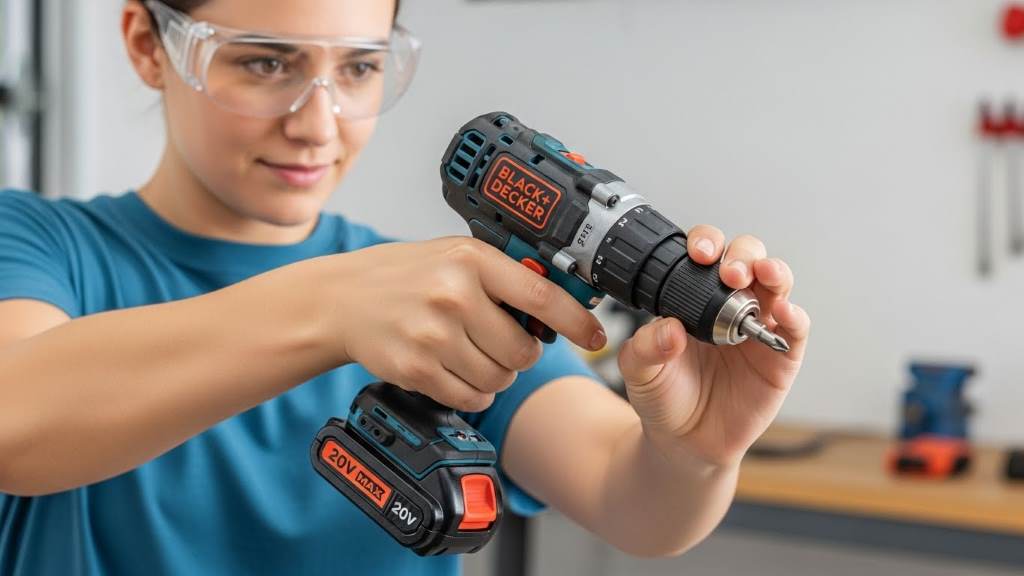
Starting a new DIY project feels exciting, yet power tools can seem intimidating at first. Many people hesitate because they worry about accidents. However, with the right knowledge, anyone can use a cordless drill safely. According to the CDC, nearly 100,000 tool-related injuries receive treatment in US emergency departments each year. Most of these incidents are preventable through proper preparation and techniques. The good news is that the BLACK+DECKER Drill for Beginners offers an ideal entry point. This 20V MAX PowerConnect model combines a user-friendly design with essential safety features. In this guide, we explore everything you need to know. We cover setup, techniques, and best practices so you feel confident from the start.
Understanding Your BLACK+DECKER 20V MAX Drill
First, familiarize yourself with the tool. The BLACK+DECKER 20V MAX PowerConnect Cordless Drill stands out for its lightweight build. It weighs around 4 pounds, which reduces fatigue during extended use. Additionally, the soft-grip handle provides comfort and better control.
This model includes a keyless 3/8-inch chuck. This feature allows quick bit changes without tools. Moreover, it has a 24-position clutch. The clutch prevents overdriving screws and stripping materials. Beginners appreciate this because it offers forgiveness during learning.
The drill features two speed settings. Low speed delivers high torque for tough tasks, while high speed suits faster drilling. An LED work light illuminates dark areas automatically when you pull the trigger. This helps in tight spaces or low-light conditions.
The POWERCONNECT system lets you share batteries across compatible tools. This versatility grows with your projects. Overall, these elements make the tool approachable for newcomers.

Essential Safety Gear You Need
Safety starts with proper gear. Always wear ANSI Z87.1 approved safety glasses. These protect your eyes from flying debris. Dust from drilling can irritate, so add a dust mask when working with wood or masonry.
Consider gloves for better grip. However, avoid loose gloves that could catch in moving parts. Tie back long hair and remove jewelry. Loose items pose risks around rotating bits.
Hearing protection matters if you drill for long periods. The tool produces noise that can affect hearing over time. Nonskid shoes keep you stable on the floor. These simple steps create a strong safety foundation.
Preparing Your Workspace
A clean workspace prevents accidents. Clear the area of clutter before starting. Keep children and pets away. Good lighting helps you see clearly.
Secure your workpiece. Use clamps to hold materials firmly. This avoids slips that cause injury. Never hold the piece in your hand or against your body.
Check for hidden hazards. Scan for electrical wires or pipes behind walls. Use a stud finder or consult building plans. This precaution avoids serious shocks or damage.
Ventilate the area well. Dust and fumes build up quickly. Open windows or use a fan to direct particles away. These habits keep your environment safe.
Charging and Battery Safety
The battery powers your drill. Charge it fully before first use. Insert the battery into the charger until it clicks. The LED indicator shows progress.
Avoid charging in extreme temperatures. Ideal range is 65°F to 75°F. Extreme heat or cold affects performance and lifespan.
Never force the battery. If it does not fit smoothly, check for debris. Clean contacts gently. Store batteries in a cool, dry place away from metal objects. This prevents short circuits.
Inspect batteries regularly. Look for cracks or leaks. Damaged ones require proper recycling. Safe handling extends battery life and reduces risks.
Installing Bits and Accessories
Start by selecting the right bit. Use twist bits for wood, masonry bits for concrete, or spade bits for larger holes. Match the bit to your material.
Open the keyless chuck. Grasp the rear collar and rotate the front counterclockwise. Insert the bit fully. Then, tighten by hand by rotating clockwise. Ensure it sits straight.
Avoid over-tightening with the tool running. This damages the chuck. For screwdriving, use the correct driver bit. The onboard holder keeps bits handy.
Check the bit sharpness. Dull bits require more force and increase kickback risk. Replace them as needed.
Basic Drilling Techniques
Hold the drill firmly with both hands. One hand grips the handle, the other supports the battery area. This control reduces twisting.
Set the clutch to the drill symbol for pure drilling. Choose speed based on material. Low for hard materials, high for soft ones.
Start slowly. Pull the trigger lightly to begin. Apply steady, straight pressure. Let the drill do the work. Forcing causes overheating or stalls.
When the bit breaks through, ease pressure. Keep the motor running while withdrawing. This clears chips and prevents jams.
Practice on scrap wood first. This builds muscle memory without risking your project.
Driving Screws Safely
Switch to screwdriving mode. Set the clutch to a low number. This prevents stripping.
Use forward direction for driving. Start slow and increase speed. If the clutch clicks, stop. Increase the setting gradually.
For removal, use reverse. Release the trigger before changing direction. This avoids damage.
Maintain straight alignment. Angled driving causes slips. Pilot holes help in hard wood.
These steps ensure clean, secure results.
Common Mistakes Beginners Make and How to Avoid Them
Many beginners force the drill. This leads to stalls and kickback. Instead, apply light pressure and let the tool work.
Another error involves loose workpieces. Always clamp materials. This prevents movement.
Ignoring direction control causes issues. Always release the trigger before switching forward or reverse.
Overloading the battery happens with constant use. Take breaks to avoid overheating.
Wearing improper gear is common. Always use safety glasses. These small changes prevent big problems.
Maintenance and Storage Tips
Clean the drill after each use. Wipe with a damp cloth. Avoid water immersion.
Check for wear. Inspect the chuck and battery contacts. Lubricate moving parts sparingly if needed.
Store in a dry place. Keep away from extreme temperatures. Remove the battery during long storage.
Regular checks keep the tool reliable. This extends its life and maintains safety.
Related:
Best Power Tools for Homeowners: Why DEKOPRO 8V Earns a Spot
Choosing the Right Kitchen Tools – Five Things that all Budding Chefs Need
Troubleshooting Common Issues
If the drill stalls, release the trigger. Check for overload or dull bits. Clear debris.
The battery fails to charge. Verify connections and temperature. Try a different outlet.
LED light dims. This signals low battery. Recharge promptly.
Motor runs slowly. Switch to the correct gear. Low speed suits heavy tasks.
These fixes solve most problems quickly.
Conclusion
Using the BLACK+DECKER 20V MAX Drill safely becomes second nature with practice. Start with proper gear, prepare your workspace, and follow techniques. These habits protect you and improve results.
Take action today. Grab your drill, set up a safe space, and start a simple project. You will gain confidence quickly. Happy building!
FAQs
What safety gear is essential for using the BLACK+DECKER 20V Drill?
Wear safety glasses, gloves, and a dust mask. Tie back long hair and use nonskid shoes. These items protect against debris and slips.
How do I change the bit on the BLACK+DECKER 20V Drill?
Grasp the rear collar and rotate the front counterclockwise to open. Insert the bit and tighten clockwise by hand. Ensure it sits straight.
Can beginners use the BLACK+DECKER 20V Drill for metal?
Yes, use appropriate bits and cutting lubricant. Start slow and apply steady pressure. This prevents overheating.
What should I do if the drill stalls?
Release the trigger immediately. Check for overload or dull bits. Clear chips and resume carefully.
How do I store the battery safely?
Keep it in a cool, dry place away from metal objects. Avoid extreme temperatures to maintain performance.
References
- BLACK+DECKER Official Product Page: https://www.blackanddecker.com/products/ld120va
- BLACK+DECKER 20V MAX Drill Instruction Manual: https://pdf.lowes.com/installationguides/885911447461_install.pdf
- OSHA Hand and Power Tools Safety: https://www.osha.gov/hand-power-tools
- CDC Tool-Related Injuries Data: https://stacks.cdc.gov/view/cdc/192044
